Getting Started with Razor View Engine
Overview
Razor is not a new programming language itself, but uses C# syntax for embedding code in a page without the ASP.NET delimiters: <%= %>. It is a simple-syntax view engine and was released as part of ASP.NET MVC 3. The Razor file extension is "cshtml" for the C# language. It supports TDD (Test Driven Development) because it does not depend on the System.Web.UI.Page class.
Razor Syntax
To understand the Razor View Engine we should learn its syntax so let's start with the syntax.
1. Single statement block and inline expression
Each code block will be start and end by opening and closing curly brackets {..} respectively. A statement is defined in a code block, in other words between opening and closing curly brackets and ending with a semicolon (";"). But when it's used as an inline expression then it does not need to use a semicolon.
Each code block will be start and end by opening and closing curly brackets {..} respectively. A statement is defined in a code block, in other words between opening and closing curly brackets and ending with a semicolon (";"). But when it's used as an inline expression then it does not need to use a semicolon.

Here we declare "message" as a variable and assigned a string to it and this variable is accessible globally with the "@" character. So the "@" character is used in both cases when we define a code block as well as a variable call and we get the output as below.

2. Multi statement block
We can also define a multiline statement block as a single-line statement block. In a multiline statement block we can define multiple code statements and can process data. A multiline block will exist between opening and closing curly braces but the opening brace will have the "@" character in the same line if we define the "@" and opening curly braces in different lines then it will generate an error.

Each statement will be endded by a semicolon in a multi-statement code block so finally we get the result as:

3. Conditional statements
We can create a dynamic web page in Razor View Engine as condition based. We can define a condition inside a code block or outside the code block. The If statement works the same as it does in other programming languages.

It is a default rule that a block statement or statements must exist within curly braces even if the block has a single statement. In the code block above we have two types of if conditions, one is inside code block so the @ character is used with code blocks starting braces and another is outside the code block so the @character is used with an if. Finally, we get the output of these two if statements.

4. Looping
All loops work the same as in other programming languages, we can define looping inside a code or outside a code block. We can define a for, do while or while loop in a code block and use the same syntax for initialization, increment/decrement and to check a condition.

We can also define a foreach in a code block that accesses data forwardly from any collection. The code block above has both for and foreach statements and their output is:

5. Comments
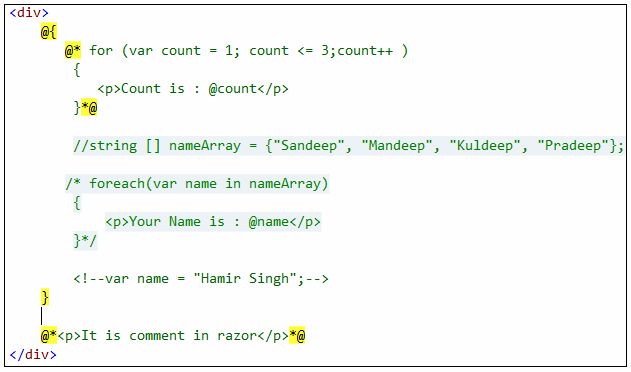
Razor View Engine has two types of comments, one is single-line and another is multiline. Razor uses the syntax "@* ..*@" for the comment block but in a C# code block we can also use "/* */" or "//". HTML comments are the same, "<!-- -->".
6. Use of Object
We can also use an object in both a code block and HTML using razor syntax.
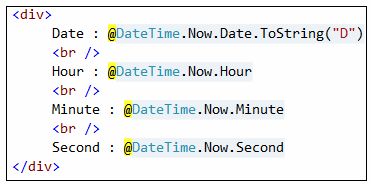
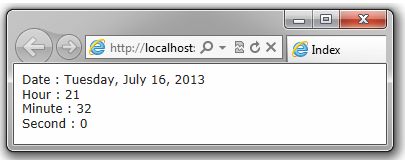
Here we used a Date object of the C# language and access the properties of its. The result of the Date object in the code above is:
So we have a rule of thumb that C# code is used in a code block that starts with "@{" and ends with "}" and whenever a variable is used in a HTML block then the variable is used with the prefix "@"
Comments
Post a Comment